
Market Dashboard
Scan US and worldwide equities with sorting, sectors, watchlists, favorites, drawdown, returns, and volume-aware views.
Platform Features
A trading intelligence workspace for scanning markets, validating algorithm behavior, building custom dashboards, and keeping watchlists, alerts, futures, Kalshi, earnings, and market briefs in one operating system.
Introducing Auto-Trader
Automated market scanning, trade qualification, Alpaca execution, and managed exits. Choose individual timeframes or bundles, with subscriptions from $99/month and automatic execution included.
Explore Auto-TraderCore System
Each feature is built around repeated market work: find the signal, test the logic, organize the workspace, and act from a cleaner view.
Scan US and worldwide equities with sorting, sectors, watchlists, favorites, drawdown, returns, and volume-aware views.
Compare live algorithm output with sortable names, symbols, returns, drawdown, premium/hot filters, and time-factored leader views.
Run and compare historical strategy tests with equity curves, drawdown, trade logs, advanced diagnostics, and saved run history.
Build widget workspaces with heatmaps, charts, watchlists, AI briefs, trade ideas, performance panels, notes, and market modules.
Generate dashboard widgets from natural-language prompts with Thelema-assisted layouts, symbol lists, heatmaps, and market modules.
Refresh AI market summaries, sync widgets, and keep brief-driven context inside the same workspace where decisions happen.
Manage simulated accounts, positions, orders, P&L, and separate wallets across stocks, futures, options, and Kalshi desks.
Rank paper accounts and challenges across markets by score, returns, P&L, activity, and drawdown.
Work across equities, futures, options research, prediction markets, and event categories without forcing everything into one stock-only model.
Track earnings calendars, global symbols, news, blog intelligence, and event context that can affect watchlists and screens.
Workflow
AlgoHunter is organized around the daily workflow of a trader who needs fast market discovery, repeatable validation, and a workspace that does not fall apart when the market gets noisy.
1. Discover
Use screeners, sectors, market-region filters, watchlists, earnings, news, futures, and Kalshi categories to find what matters.
2. Validate
Run back-tests, review algorithm performance, compare return and drawdown, and inspect timeframe behavior before treating a signal as useful.
3. Organize
Build custom dashboards and heatmaps that are independent of a single watchlist or tied to saved market groups when needed.
4. Monitor
Use alerts, market briefs, widget sync, and saved preferences to keep the system aligned with the markets you actually trade.
Coverage
The platform is being built around market types, not just ticker rows, so the workflow can include global assets and event-driven markets.
Desks and Intelligence
Each desk keeps its market-specific controls, risk context, paper trading tools, and supporting intelligence close to the workflow.
Forward tests, futures challenges, paper positions, reports, strategy attribution, trade tickets, and futures-specific alerts.
Live event-market discovery, YES/NO paper orders, probability views, market detail, and a separate Kalshi paper wallet.
Options activity, strategy setup, paper options orders, position tracking, and clear indicative-pricing notices for research workflows.
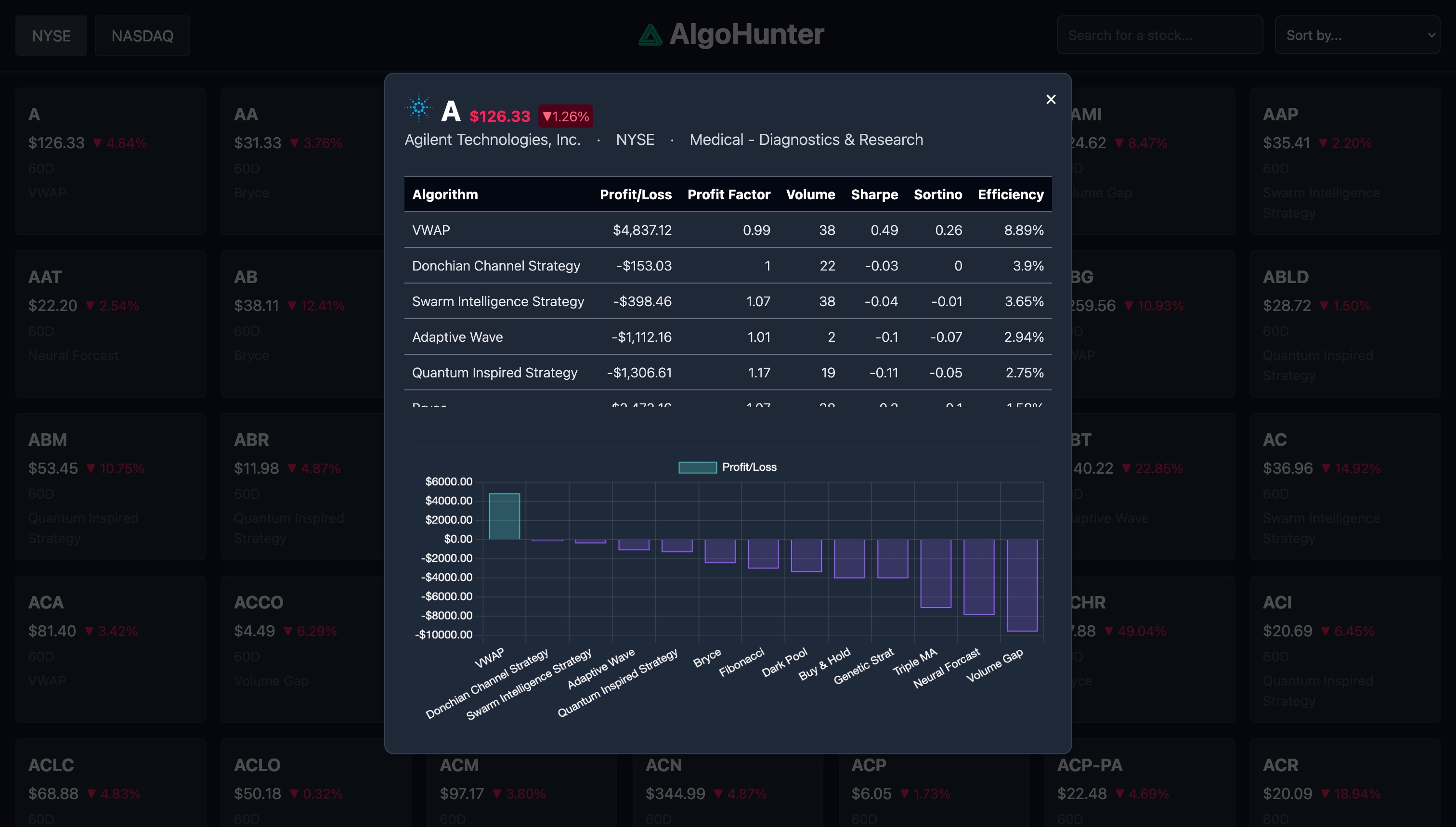
Ticker-level quote/profile context, algorithm comparison charts, performance tables, and deeper run-level inspection.
Custom symbol heatmaps, sector maps, independent heatmap widgets, and scanner views that can be built outside a watchlist.
Market-specific alerts, algorithm visibility controls, timeframe preferences, and saved settings across stocks, futures, Kalshi, and foreign symbols.
Unified watchlists across settings and dashboard, plus favorites by asset type for stocks, futures, options, crypto, and Kalshi categories.
Analyst consensus, ratings history, institutional ownership, latest 13F, political, insider trades, news pulse, and risk-monitor widgets.
Profile settings, identity groups, library/favorites management, API connection planning, and execution preference surfaces.
Start with the plan that matches the level of infrastructure you want, then build the workspace around the markets you follow.